The temporary workspace your Mac deserves.
A free menu-bar app that auto-captures your clipboard, summons a shelf at your cursor, turns screenshots into text, and previews your windows — without the clutter.
- Notarized by Apple
- 100% on-device
- Source-available
- No subscription
- — downloads
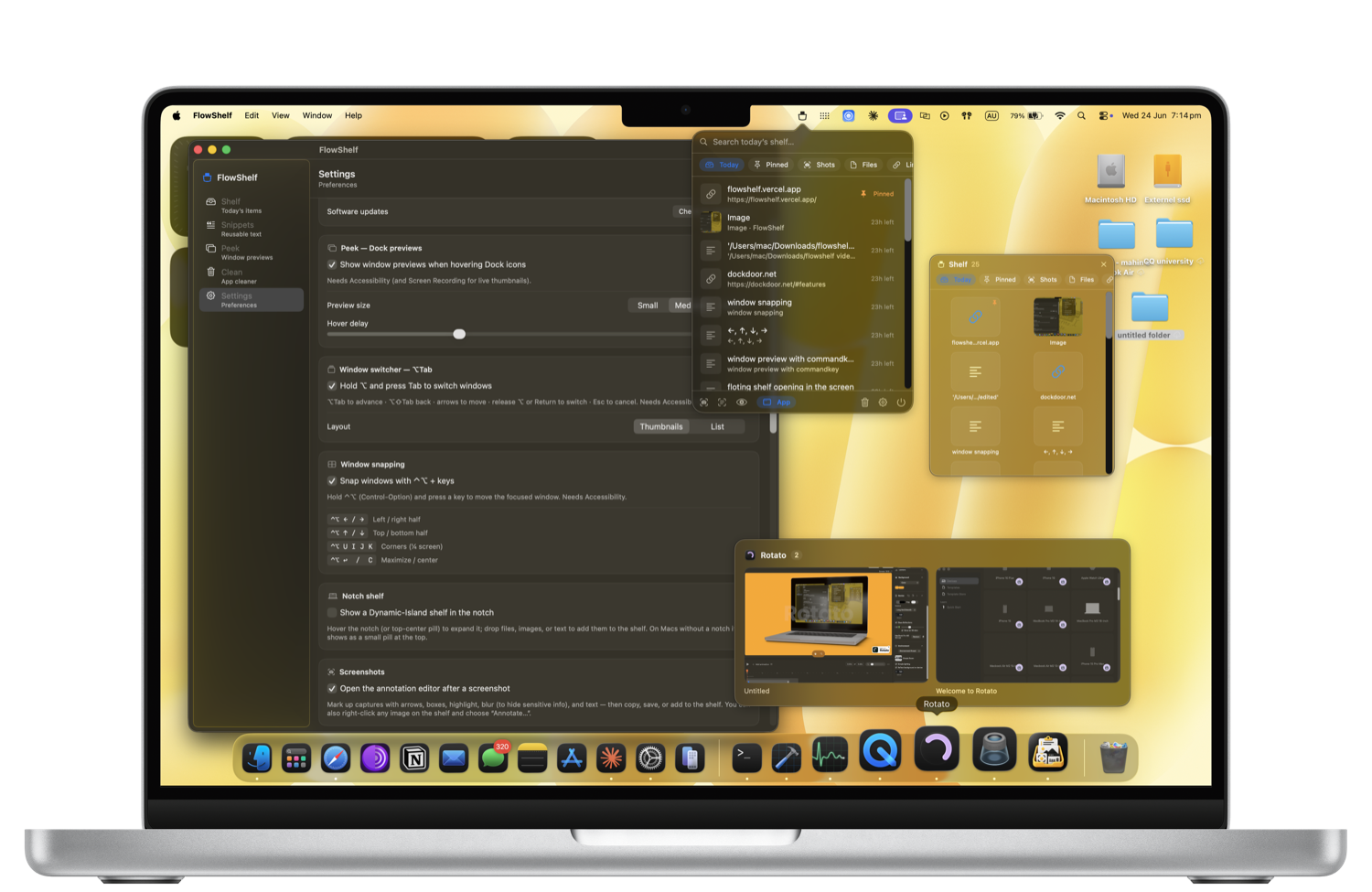
One app. Everything you juggle all day.
The shelf is just the start — FlowShelf folds a whole stack of Mac utilities into one lightweight, private menu-bar app.
Everything you copy, in one place
Copies, screenshots, files, and links all land on a self-cleaning shelf. Search it, pin what matters, and it clears itself after 24 hours so it never becomes clutter.
A shelf that comes to your cursor
A glass shelf appears wherever you're working. Drop files in, carry them between apps, and drag them out at the destination — no window-juggling.
Summon it with a quick shake
Give your mouse a little shake and the shelf pops up right where you are — no hotkey to remember, no menu to hunt for.
Carry things between apps
Park files, text, and images on the floating shelf, switch apps, then drag or paste them out exactly where you need them.
Your notch, finally useful
A Dynamic-Island-style shelf lives right in your MacBook notch — and on external monitors too. Swipe down to open, drop files in, click a tile to copy.
Snap windows with a keystroke
Hold ⌃⌥ and tap an arrow to snap the focused window to halves, quarters, or fullscreen. The one Mac feature you'd usually pay for — built in.
Preview windows without clicking
Hover a Dock icon for live thumbnails of its windows. See what's open and jump straight to the exact window you want.
See every window at a glance
Hold the key and your windows fan out as live previews. Pick the one you want and switch to it instantly — no fumbling through ⌘-Tab.
Reusable text, one click away
Save signatures, addresses, and canned replies once. Paste them anytime from the dashboard or straight from the menu-bar menu.
A full screenshot toolkit, built in
Grab a region or a window, then mark it up with arrows, shapes, a real highlighter, numbered steps, and text. Blur, pixelate, or black out anything sensitive. Drop a spotlight, add a magnifier callout, measure in pixels with the ruler, or wrap the shot in a gradient backdrop. Pin it on top of everything, scan a QR code, or stitch a before/after — then copy, save, or drop it on your shelf.
Private AI that never leaves your Mac
Summarize, rewrite, translate, and smart-search your shelf — powered by Apple's on-device models. No accounts, no cloud, no cost, and it runs only when you ask.
Uninstall apps completely
Drag an app in and FlowShelf finds every leftover — caches, preferences, support files — and moves them to the Trash. It even tells you what it couldn't remove.
One app, instead of five.
FlowShelf does what you actually used these popular Mac apps for — in one free, private menu-bar app.
| What you’d reach for | Typical price | FlowShelf |
|---|---|---|
| Paste / Maccy clipboard & shelf | $29.99/yr | ✓ Included |
| Magnet window snapping | $4.99 | ✓ Included |
| AltTab window switcher | Free | ✓ Included |
| CleanShot X screenshots & annotate | $29 | ✓ Included |
| AppCleaner uninstaller | Free | ✓ Included |
| … plus snippets, a notch shelf & on-device AI | $60+/yr value | Free |
Easy installation.
Drag, drop, and you're good to go.
 FlowShelf
- 1Open the branded installer
Double-click the
.dmgfile. - 2Drag to Applications
Install FlowShelf like any native Mac app.
- 3Launch & Go
FlowShelf is ready. No setup. No signup.
FlowShelf 1.4.0 is Developer ID signed and notarized by Apple. Its polished drag-to-install window opens normally on macOS.
Privacy First
Your data stays on your Mac.
Native Performance
Built with Swift, ~7 MB, light on memory.
Apple Silicon + Intel
All modern Macs.
No Subscription
One-time, yours forever.
Built in the open.
FlowShelf's source is public. Read every line, verify the privacy claims for yourself, and open a pull request — no black boxes, no hidden network calls.

Made by one person, not a corporation.
Hi, I'm Mahin Kadery — a solo developer. I built FlowShelf because I was tired of running five separate apps (and paying five subscriptions) for the little things a Mac should just do. No investors, no growth team, no data collection — just an app I use every day and keep improving. If something breaks, the person reading your bug report is the person who wrote the code.
Loved by people who hate clutter.
Real reviews from FlowShelf users — no account needed to read or leave one.
Loading reviews…
Reclaim your Mac's clutter.
Free, native, and yours forever. macOS 14+ · Apple Silicon & Intel.
- ✓ Signed & notarized by Apple (Developer ID)
- ✓ Source-available — read the code
- ✓ 100% on-device — no account, no tracking, no servers
The button copies: brew install --cask mahinkadery/tap/flowshelf
Verify your download (SHA-256)
Every release ships with its checksum in the release notes. Current version 1.6.2:
2d852e9c34abdd1be0e5e5ad29c75e8fdb84be5b94baeb20c58220c5f959251f
In Terminal, run shasum -a 256 ~/Downloads/FlowShelf.dmg — the output must match exactly.
Questions & answers
Everything you need before your first launch.
Is FlowShelf really free?
Yes. FlowShelf is free and source-available, with no subscription and no account required. Download it once and it's yours.
Can FlowShelf turn a screenshot into text (OCR)?
Yes. Press ⌘⇧O to select any region of your screen and FlowShelf extracts the text straight to your Shelf and clipboard. Press ⌘⇧7 for a plain region screenshot.
What is the floating shake-to-summon shelf?
Shake your cursor (or use a global hotkey) and a floating glass shelf appears right at your pointer, so you can drop and grab items without leaving what you're doing. You can also use the menu-bar popover or the dashboard.
Does FlowShelf have a private mode?
Yes. Private mode pauses clipboard capture whenever you want, so sensitive copies never land on your Shelf.
How do updates work, and why do my permissions persist?
FlowShelf checks for updates daily and installs them with Sparkle, the standard macOS auto-updater. Version 1.3.4 and later use the same Apple Developer ID identity, helping Accessibility and Screen Recording permissions persist across future updates.
Is FlowShelf signed and notarized by Apple?
Yes. FlowShelf is Developer ID signed and notarized by Apple, so the app opens normally on macOS.
Where is my data stored?
Everything stays on your Mac. FlowShelf has no servers and no tracking — your clipboard, screenshots, files, links, and text never leave your device.
How does auto-delete work?
Shelf items expire automatically after 24 hours to keep today's workspace light. Pin anything you want to keep, or clear items manually whenever you like.
Which Macs are supported?
macOS 14 (Sonoma) or later, as a universal binary for both Apple Silicon and Intel.
How is FlowShelf different from Yoink, Dropover, or a clipboard manager?
FlowShelf combines a drag-and-drop shelf, automatic clipboard capture, screenshot OCR, and live window previews in one private menu-bar app — and it auto-cleans daily so it never becomes clutter. It's free and source-available.